View PDF
1. WLAN / WiFi (Wireless Local Area Network)
WLAN and WiFi are different names for the same technology. They operate in the license-free ISM (Industry, Science, and Medicine) frequency bands, primarily at 2.4 GHz and 5.8 GHz. They are ideal for autonomous local networks (like campuses, airports, or homes) due to their flexible installation.
Network Architectures:
-
Infrastructure Mode: Mobile devices (Terminal Stations or STA) connect wirelessly to a central Access Point (AP).
-
BSS (Basic Service Set): A single AP and its connected devices.
-
ESS (Extended Service Set): Multiple BSSs connected together via a distribution system or portal (like an Ethernet backbone) to form one large logical network.
-
-
Ad-hoc Mode (IBSS - Independent Basic Service Set): Devices connect directly to each other without a central AP. This requires no previous planning and is highly valuable during natural disasters (earthquakes, fires) when standard infrastructure is destroyed.
Key Characteristics & Limitations:
-
Advantages: Very easy to install, no new cabling required in old buildings, and it doesn’t disrupt existing firewalls. It can also adapt its modulation based on interference using DMT (Discrete Multi-Tone).
-
Disadvantages: The bandwidth is narrow compared to wired networks. Because the ISM band is free, it is shared by many users, causing interference and resulting in no guaranteed Quality of Service (QoS).
-
Power Regulations: To limit interference, transmit power is legally capped: 100 mW in Europe and 1 W in the USA. Power management (Sleep-mode) is critical to save battery life.
MAC Layer Protocols & CSMA/CA:
To avoid data collisions when multiple devices try to “speak” at once, WLAN uses CSMA/CA (Carrier Sensing Multiple Access / Collision Avoidance). It separates traffic by priority using different waiting times called IFS (Inter Frame Spacings):
-
SIFS (Short IFS): The shortest wait time (Highest priority). Used for critical control messages like Acknowledgements (ACK) and Clear-to-Send (CTS).
-
PIFS (PCF IFS): Medium wait time. Used for time-bounded (circuit-switched-like) services managed by a Point Coordination Function.
-
DIFS (DCF IFS): The longest wait time (Lowest priority). Used for standard asynchronous data.
If the medium is busy, a device uses a random “back-off” timer to wait, ensuring two waiting devices don’t transmit simultaneously when the channel clears.
The Hidden Station Problem:
If two laptops are connected to the same AP but are too far apart to hear each other, they might transmit at the same time, causing a collision at the AP.
- Solution: A sender first transmits an RTS (Ready to Send) message reserving the medium for a specific time. The AP replies with a CTS (Confirm to Send). All devices hear the CTS and stay quiet. Successful data transfer is confirmed with an ACK message.
Major IEEE 802.11 Standards:
-
802.11b: 2.4 GHz band, 22 MHz bandwidth.
-
802.11g: 2.4 GHz band, uses OFDM for up to 54 Mbps.
-
802.11a: 5 GHz band, uses OFDM for up to 54 Mbps.
-
802.11n: 2.4 and 5 GHz, uses MIMO antennas for up to 600 Mbps.
-
802.11ac: 5 GHz band, uses wider channels (up to 160 MHz) and up to 256QAM modulation to reach 6.9 Gbps.
-
802.11ad: Uses 60 GHz (mm waves) for short-range (<10 m) speeds up to 6.7 Gbps.
Channel Spacing Formula (2.4 GHz): . (Channels 1, 6, and 11 are non-overlapping in the US).
Data Rate for IEEE 802.11 g
| RSSI (dBm) | SNR 4 | SNR 5 | SNR 6 | SNR 7 | SNR 8 | SNR 9 | SNR 10 | SNR 11 |
|---|---|---|---|---|---|---|---|---|
| -94 | 1 | 1 | 1 | 1 | 1 | 1 | 1 | 1 |
| -91 | 1 | 1 | 2 | 2 | 2 | 2 | 2 | 2 |
| -87 | 1 | 1 | 2 | 2 | 5.5 | 5.5 | 5.5 | 5.5 |
| -86 | 1 | 1 | 2 | 2 | 6 | 9 | 9 | 18 |
| -84 | 1 | 1 | 2 | 2 | 6 | 9 | 9 | 18 |
| -82 | 1 | 1 | 2 | 2 | 6 | 9 | 11 | 24 |
| -80 | 1 | 1 | 2 | 2 | 6 | 9 | 11 | 36 |
| -75 | 1 | 1 | 2 | 2 | 6 | 9 | 11 | 48 |
| -71 | 1 | 1 | 2 | 2 | 6 | 9 | 11 | 54 |
2. Bluetooth (WPAN)
Bluetooth is a standard for WPAN (Wireless Personal Area Networks), formally defined as IEEE 802.15-1. Initially developed by Ericsson, it is meant to replace short-range cables connecting phones, PCs, printers, and headsets.
Technical Features:
-
Frequency & Transmission: Uses the 2.4 GHz ISM band (79 channels, 1 MHz spacing). To survive interference, it uses FHSS (Frequency Hopping Spread Spectrum) combined with Time Division Duplex (TDD). It hops between frequencies 1600 times per second!
-
Power & Range: Extremely low power, offering a typical range of under 10 meters (up to 100m with directional antennas).
-
Services:
-
SCO (Synchronous Connection Oriented): 64 kbps, point-to-point, symmetric. Used for real-time voice. Uses Forward Error Correction (FEC) because retransmissions would cause too much delay.
-
ACL (Asynchronous Connectionless): Up to 723.2 kbps (asymmetric) or 433.9 kbps (symmetric). Used for data. Supports point-to-multipoint and uses retransmissions (ARQ) to fix errors.
-
Network Architecture (Pico-nets):
A Bluetooth network is called a Pico-net.
-
Master: One device per pico-net acts as the master. It provides the clock and dictates the pseudo-random frequency hopping sequence.
-
Slaves: Up to 7 active devices can be connected and transmitting (Active Member Address - AMA).
-
Parked Members (PMA): A pico-net can hold over 200 passive, “parked” members. They do not actively transmit but occasionally “sniff” the network to maintain synchronization, drastically reducing battery consumption (from ~53 mA active to just 0.5 mA in sniff mode).
Security:
Devices are connected through a Pairing process using a 16-byte PIN. This generates a 128-bit link key used for authentication and a 128-bit stream cipher to encrypt the data over the air.
3. Other Wireless PAN and WAN Technologies
The IEEE has standardized several other specific wireless technologies:
-
802.15-2: Manages coexistence and interference between WLAN and Bluetooth.
-
802.15-3 (a/b/c): High data rate WPAN for multimedia. The ‘c’ variant uses 57-64 GHz to achieve over 2 Gbps.
-
802.15-4 (ZigBee): Designed for extremely low power and low data rates (<250 kbps). Perfect for home automation and sensors where changing batteries is difficult.
-
802.16 (WiMax): A Wireless MAN (Metropolitan Area Network). A broadband alternative to DSL, offering up to 75 Mbps over 50 km in Line of Sight (LOS), or 10 km Non-LOS. 802.16e supports mobile roaming up to 150 km/h.
-
802.20 (MBWA): Mobile Broadband Wireless Access. Supports high-speed mobility (up to 250 km/h) with >1 Mbps per user.
-
802.22 (WRAN): Wireless Regional Area Networks utilizing vacant TV broadcast spectrums.
RFID (Radio Frequency Identification):
Standardized by ISO/IEC 18000. Used for asset tracking, toll collection, warehouse management, and hospital patient tracking.
-
Passive Tags: No battery. They power up using the radio energy sent by the reader. Range: ~3 meters.
-
Active Tags: Have a built-in battery. Range: 30-100 meters.
-
Key Traits: Uses frequencies like 125 kHz, 13.56 MHz, 433 MHz, etc. Unlike lasers/IR, RFID withstands harsh environments (frost, dirt, sunlight) and doesn’t need line-of-sight. They are, however, vulnerable to Denial-of-Service attacks or physical shielding.
| Band | Regulations | Range | Data speed |
|---|---|---|---|
| 120–150 kHz (LF) | Unregulated | 10 cm | Low |
| 13.56 MHz (HF) | ISM band worldwide | 10 cm–1 m | Low to moderate |
| 433 MHz (UHF) | Short range devices | 1–100 m | Moderate |
| 865–868 MHz (Europe) | ISM band | 1–12 m | Moderate to high |
| 902–928 MHz (America) | ISM band | 1–12 m | Moderate to high |
| 2450–5800 MHz (microwave) | ISM band | 1–2 m | High |
| 3.1–10 GHz (microwave) | Ultra wide band | Up to 200 m | High |
4. Satellite Communications
Satellites seamlessly cover vast geographical areas (oceans, deserts) where laying cable infrastructure is economically or physically impossible.
| Band | Frequencies used |
|---|---|
| HF-Band | 1.8 – 30 MHz |
| VHF-Band | 50 – 146 MHz |
| UHF-Band | 0.43 – 1.3 GHz |
| L-Band (GEO, LEO) | 1.53 – 2.7 GHz |
| S-Band (GEO, LEO) | 2.7 – 3.5 GHz |
| C-Band | DL 7.25 – 7.745 GHz, UL 7.9 – 8.395 GHz |
| X-Band | DL 3.7 – 4.2 GHz, UL 5.925 – 6.425 GHz |
| Ku-Band (Europe) (GEO, LEO) | DL FSS 10.7–11.7 GHz, DL Telecom 12.5–12.75 GHz, DBS 11.7–12.5 GHz, 17.3–18.1 GHz, UL FSS & Telecom 14.0–14.8 GHz |
| Ku-Band (America) (GEO, LEO) | DL FSS 11.7–12.2 GHz, DBS 12.2–12.7 GHz, 17.3–17.8 GHz, UL FSS 14.0–14.5 GHz |
| Ka-Band (GEO, LEO) | 18 – 31 GHz |
Satellite Orbits:
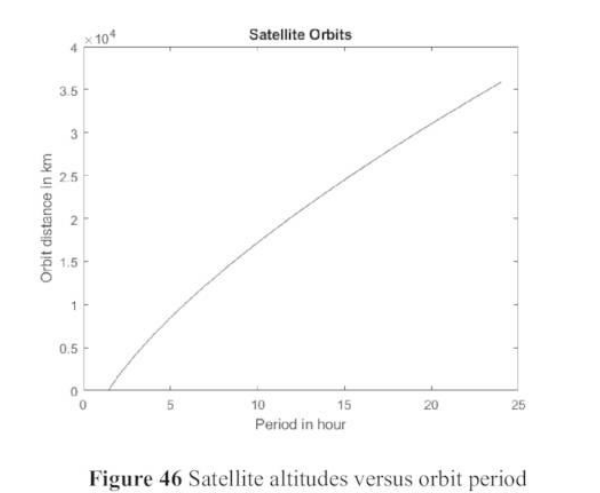
Satellites balance the earth’s gravitational pull against centrifugal force to stay in orbit ().
-
GEO (Geostationary Earth Orbit): Altitude ~36,000 km. Orbit period is exactly 24 hours, so it appears perfectly stationary in the sky.
-
Pros: Ground antennas don’t need to move/track. Excellent for TV broadcasts (DVB-S).
-
Cons: Massive distance causes high latency (~100ms one-way, ~200ms total), making real-time voice calls very awkward.
-
-
MEO (Medium Earth Orbit): Altitude ~10,000 km.
-
LEO (Low Earth Orbit): Altitude 100-1500 km.
-
Pros: Low latency. Great for interactive voice and data.
-
Cons: Satellites move rapidly across the sky. Requires a massive constellation of satellites and complex handovers to keep users connected.
-
Network Architecture & Handovers:
Satellite networks use databases similar to cellular networks: HLR (Home Location Register), VLR (Visitor Location Register), and SUMR (Satellite User Mapping Register) to track users globally. To reduce delay, modern systems use Inter-Satellite Links (ISL) to route data in space before dropping it down to an Earth Gateway.
Types of Handovers:
-
Intra-satellite: Moving between different spot beams on the same satellite.
-
Inter-satellite: Switching from one satellite to another.
-
Earth Gateway: User stays on the same satellite, but the satellite routes the signal to a new ground station.
-
Inter-system: Switching from the satellite network to a terrestrial network (like GSM, LTE, or PSTN).
Signal Attenuation Issues:
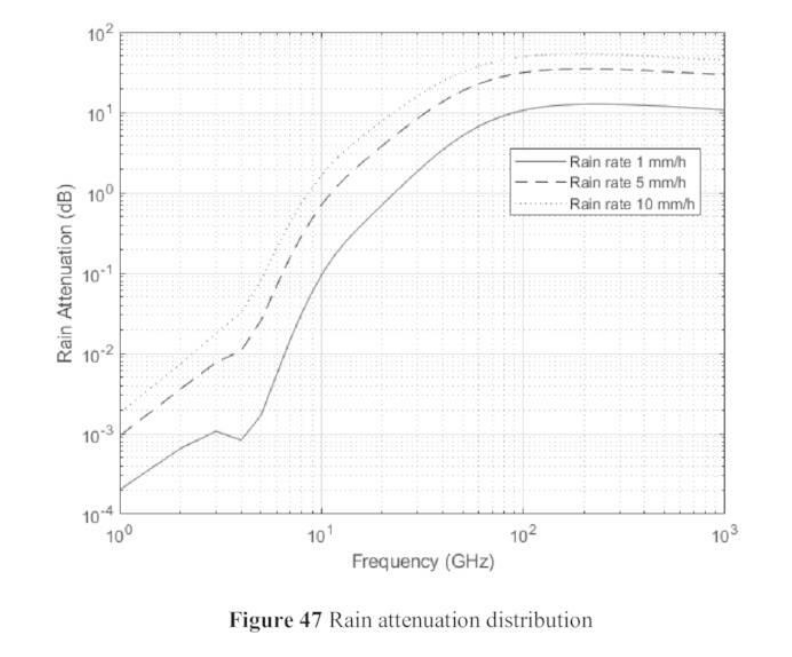
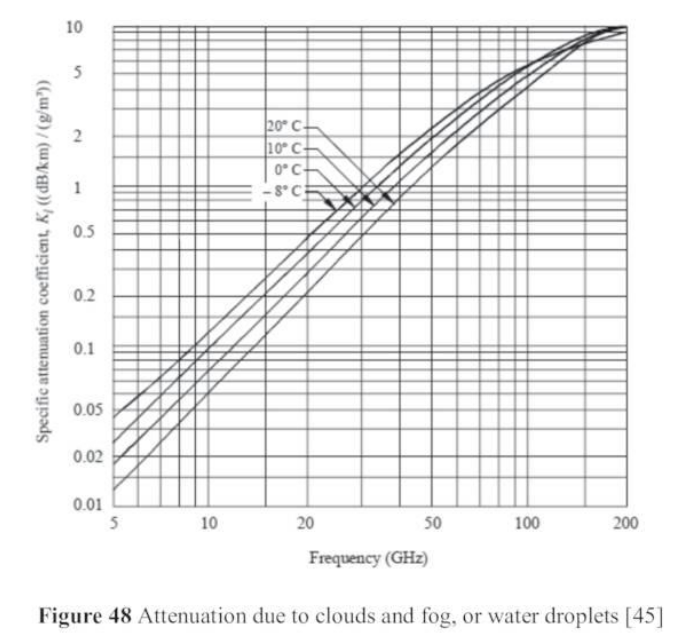
Satellites require Line of Sight (LOS) and are heavily impacted by weather.
-
Rain Attenuation: Rain absorbs and scatters microwave signals, causing severe outages (especially in tropical zones and higher frequencies like Ka-band).
-
Fog and Clouds: Water droplets cause further absorption.
-
Mitigation: Systems use uplink-power control, adaptive FEC (Forward Error Correction), and site diversity (using multiple satellites at once).
5. Broadcast Services
Analog broadcasting (NTSC, PAL, FM radio) is largely being replaced by digital formats. Digital broadcasting offers superior spectral efficiency and utilizes Forward Error Correction to guarantee high quality.
DAB (Digital Audio Broadcast):
-
Technology: Relies on COFDM (Coded Orthogonal Frequency Division Multiplex). Instead of using one wide frequency, it breaks the signal into hundreds of narrow, overlapping subcarriers (up to 1536).
-
Why it works: These subcarriers are mathematically orthogonal, meaning they don’t interfere with each other, eliminating the need for complex hardware filters. It is incredibly robust against multipath propagation (signals bouncing off buildings).
-
Guard Intervals: To prevent Inter-Symbol-Interference (ISI) from delayed bouncing signals, a small “guard interval” of silence is placed between data symbols.
-
Channels:
-
MSC (Main Service Channel): Carries the actual audio and multimedia payload.
-
FIC (Fast Information Channel): Carries control and configuration blocks.
-
SC (Synchronisation Channel): Keeps the transmitter and receiver perfectly aligned.
-
DVB (Digital Video Broadcast):
Initially formed by the European Launching Group (ELG), DVB uses MPEG-2 and MPEG-4 compression to distribute digital TV. The physical modulation is specifically tailored to the medium being used:
-
DVB-T (Terrestrial): Broadcast over the air to antennas. Like DAB, it suffers from multipath reflections, so it uses OFDM with many subcarriers and guard intervals.
-
DVB-S (Satellite): Satellites have weak signal strength and use highly nonlinear power amplifiers. Therefore, it uses phase modulation with constant amplitude, like QPSK or 8PSK.
-
DVB-C (Cable): Coaxial cables have limited bandwidth but very low noise. Therefore, highly dense and spectrally efficient modulation like 16-QAM to 256-QAM is used.
DVB Service Information Tables:
DVB uses a container system to manage the multiplexed channels.
-
NIT: Network Information Table (lists services provided).
-
SDT: Service Description Table (names and parameters of channels).
-
EIT: Event Information Table (current TV guide/show status).
-
TDT: Time and Date Table (updates set-top box clocks).
Note: Broadcasting is naturally asymmetric (downlink only). If an interactive return channel is needed, it typically utilizes terrestrial connections like xDSL or PSTN.
Links:
Unit 1 Information Theory and Communication Technologies
Unit 2 Wireless Communication Technologies
Unit 3 Cellular Mobile Networks
Unit 4 Free Space Optical Communications
Unit 5 Network Security and Management